- Blog
- How to Write a Confirmation Email? Examples, Best Practices, Key Elements
How to Write a Confirmation Email? Examples, Best Practices, Key Elements

 Chatgpt
 Perplexity
Table of Contents
Imagine that after placing the order of your soon-to-be new favorite sneakers you don’t get an email confirmation.
How would that make you feel? A bit anxious, perhaps?
It’s strange to think that, even in 2024, some businesses still overlook the power of a well-crafted purchase confirmation email.
Confirmation messages are not just routine communications, they’re your first post-purchase touchpoint with your customer. They reassure, they inform, and they start building that bridge towards customer loyalty and positive word-of-mouth.
In the following article, we’ll unpack the world of confirmation emails. From their various types to the best practices that make them shine, sprinkled with illustrative examples to inspire your own, we’ve got a lot to cover.
Let’s jump in.
What is a confirmation email?
A confirmation email is a transactional email that is sent to your customers after they complete a specific action.
This could be anything from placing an online order to subscribing to a newsletter or registering for a new service.
The primary purpose of confirmation emails is to let the customer know that you have acknowledged them and to let them know what the next steps are.
But these emails also serve another, profound purpose: forging a connection.
Yes, in those few paragraphs of text, you’re laying the foundation for a relationship built on trust and engagement. This early interaction is your golden opportunity to impress, reassure, and welcome your customer into your brand’s family.
4 types of confirmation emails
Let’s dive deeper into the world of email confirmations. Here are the most common types of confirmation emails.
1. Order confirmation email
Shopify ecommerce businesses typically send out a Shopify order confirmation email after a customer places an order on their website.
These emails contain order details, including the items purchased, order total, estimated delivery date, and shipping address.
They may also provide a link to track the order’s progress and contact details for customer support.
2. Registration confirmation email
When someone registers for a product or service on your website, they should receive a registration confirmation email.
If you’re running a webinar, for example, you would send each registrant a confirmation with the date & time of the webinar, the link to join, and information on pre-webinar prep, if any.
This is also an excellent chance to let your personality shine and get the person on the other end excited about you!
3. Booking confirmation email
The booking confirmation email summarizes the customer’s purchase and acts as a thank you note to them for choosing your business.
You send this type of email confirmation after booking flights, concert tickets, tours, and more!
4. Subscription confirmation email
Subscription confirmation is an email sent to new subscribers to confirm their subscription to a newsletter or email list.
It serves as a welcome message and often includes information on how subscribers can stay connected, such as adding the sender’s email address to their contacts.
You can also create a content workflow so that your brand message across all your emails are consistent.
Additionally, these emails may include a token of appreciation, such as a discount code for future purchases.
Why are confirmation emails important?
Confirmation emails are powerful tools that can increase customer confidence, foster brand loyalty, and contribute to long-term customer relationships.
They’re reassuring. When you send one, it lets the user know that you’ve acknowledged them.
When you’ve put the user at ease, you’re off to a brilliant start in building a strong relationship with them.
With a confirmation email, you set the tone as a brand that values proactive and clear communication.
Besides the communication aspect, confirmation emails provide patterns into customer behaviors/preferences.
They can boost your click-through rate because they contain crucial customer information. And they give you an opportunity to upsell products/services alongside the confirmation message.
Let’s take a closer look at how the different confirmation emails do this:
- Order confirmation emails dramatically eases post-purchase anxiety with a clear summary of the customer’s order. If you want them to continue purchasing products from you, order confirmation emails are essential pieces of communication.
- Registration confirmation emails get the user excited about your upcoming event. Excitement is an essential part of creating a loyal fanbase who will engage with your future events.
- Subscription confirmation emails are also important for building up excitement for your subsequent content. Set the right tone with a warm welcome confirmation message for your new subscriber.
- Booking confirmation emails are another excitement builder. Imagine getting an email confirming your booking for a hiking trip for the first time.
Now that you know the importance of each type of confirmation email, let’s look at the 4 pillars of high performing confirmation emails.
4 confirmation email best practices
The message in your confirmation emails will vary depending on the type of confirmation you’re sending.
However, it’s important to keep the following pillars in mind regardless of what type of confirmation email it is:
1. Keep it short and sweet
Get to the point. Don’t waste your customer’s time with a long or irrelevant message. Keep your confirmation email succinct by including only the essential information.
This doesn’t mean that you have to be boring. You can infuse personality while keeping it short by using a fun subject line or informal copy in the email’s body.
2. Branding matters
Branded confirmation emails show professionalism. It lets your customer know that they’re dealing with someone who takes their brand perception seriously.
You don’t have to spend hours wrestling with complicated software to do this. There are plenty of top email providers that make creating branded emails a breeze.
3. Be mobile-friendly
We live in a mobile-first world. Responsiveness and seamless transition from big screens to smaller screens is the norm now.
Ensure that your emails are mobile-friendly and avoid losing valuable customers because of a bad user experience. A common email mistake, you can easily avoid. Test the emails beforehand and make sure that they load quickly, the text is legible and easy to read.
4. Include a clear, powerful call-to-action
Don’t leave your customer hanging and wondering what to do next. Make their experience with you effortless by providing simple instructions in your confirmation email. Strong calls-to-action include:
- Asking them to refer friends and family
- Asking them to follow you on social media
- Helping them claim a special discount offer on an item as a reward
What are some key elements to include in a confirmation email?
When crafting confirmation messages, there are several key elements that should be included to ensure effectiveness and clarity.
These elements include the subject lines, the body of the email, a clear call-to-action (CTA), and a professional closure.
Subject lines play a crucial role as it is the first thing the recipient sees. It should be concise, informative, and personalized if possible.
In terms of the email body, it’s essential to keep the content succinct and to the point. The primary goal of a confirmation email is to confirm registration and provide all the necessary and relevant information. Including bullet points can help highlight important details and make the content easy to skim through.
A clear call-to-action is another vital component of a confirmation email. The CTA should guide the recipient on what to do next. It should be relevant, prominent, and easy to understand to avoid confusion.
Finally, a professional closure is essential to wrapping up a confirmation email. Expressing gratitude to the recipient for their time and including details about the sender, such as contact information or a signature, adds a personal touch and emphasizes readiness for further assistance.
By incorporating these key elements, confirmation emails can effectively communicate information, engage recipients, and leave a positive impression on the reader.
How to set up confirmation emails (in 5 steps)
Before sending outstanding confirmation emails, you need to register to an email marketing software. Here’s a handy guide to get you set up in no time.
Step 1: Build an opt-in email list
You can have different lists depending on which form your website visitors subscribed through.
Creating an opt-in list can help you connect your existing website forms to a specific email list. This allows you to separate new users (the ones you will send confirmation emails to) from other users.
Step 2: Select your email trigger
You can create personalized and automated confirmation emails that get triggered when a user takes a desired action. This could be:
- When a user gets added to a list
- When a user clicks a link on an email
- When a user submits a form on your website
- And more!
Setting up automated emails can take some getting used to, but you’ll be glad when you get the hang of it. They save you time and are easily personalized so that your user doesn’t get a generic, uninspired email.
Step 3: Create your email(s)
It’s time to craft your confirmation email!
How do you craft a powerful confirmation message? What subject should you use? Do emojis matter? How long should the message be? Formal or informal tone?
Get some answers and inspiration from the email marketing gurus at Mailchimp with this guide.
Step 4: Automate the first email
Congratulations on writing your first confirmation email. It’s time to automate it so that it goes out shortly after the user takes a desired action.
Your email marketing software will allow you to time the release of your email based on time zones and other specifications you have.
Step 5: Automate further emails based on conditions
Setting conditions, like double opt-in, gives you insight into the behaviors of your new users. If you include a confirmation button in your first email, you’ll be able to see who opened the confirmation email, who clicked the button, and who did not.
For example, for those who opened the first email but didn’t confirm, you can send them a reminder email.
If they didn’t open the first email, you could try a different subject line.
If they both opened and confirmed, then you’re good to go with the other onboarding emails.
Automated email campaigns make it easy to tailor emails sent to each person on your email list based on their unique behavior.
Here’s a detailed guide on proven automation workflows you can use.
8 examples of powerful confirmation emails
Now it’s time to take a closer look at some powerful confirmation email examples.
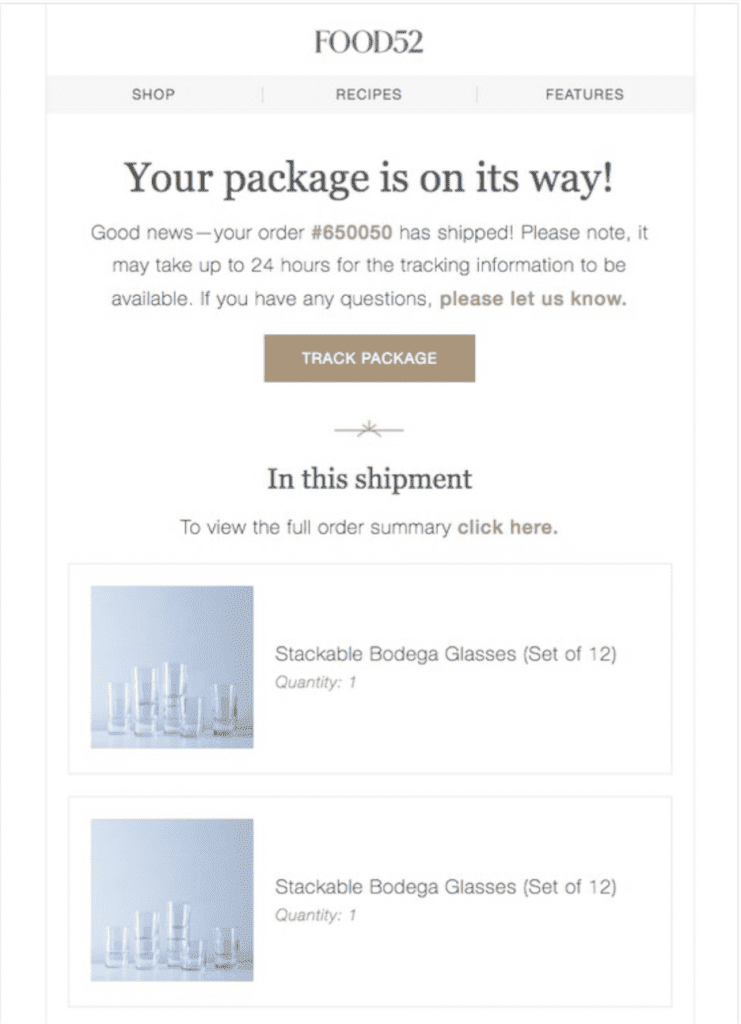
1. Food52
Source: reallygoodemails.com
Why this order confirmation email shines:
It provides a full summary of the order and provides a tracking link. These two elements ease post-purchase anxiety and build up excitement, respectively.
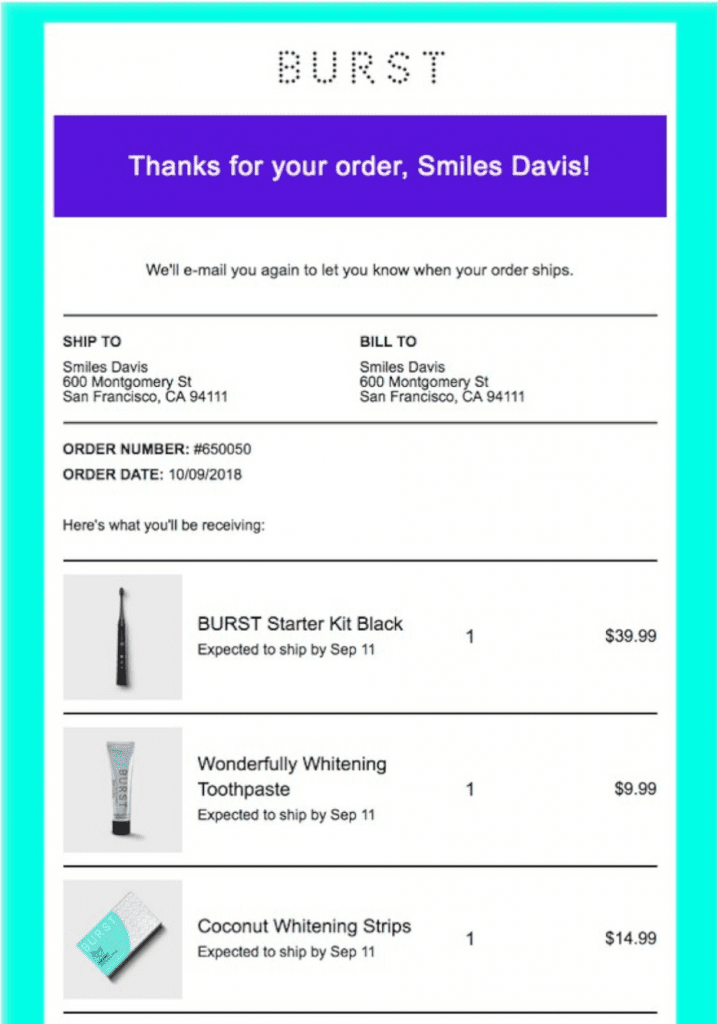
2. BURST Oral Care
Source: reallygoodemails.com
Why this order confirmation email shines:
It’s branded, colorful, and provides a full summary of the order placed. Another powerful piece of this confirmation email is letting the customer know that they will receive another email when their order ships. That extra bit of proactive communication goes a long way.
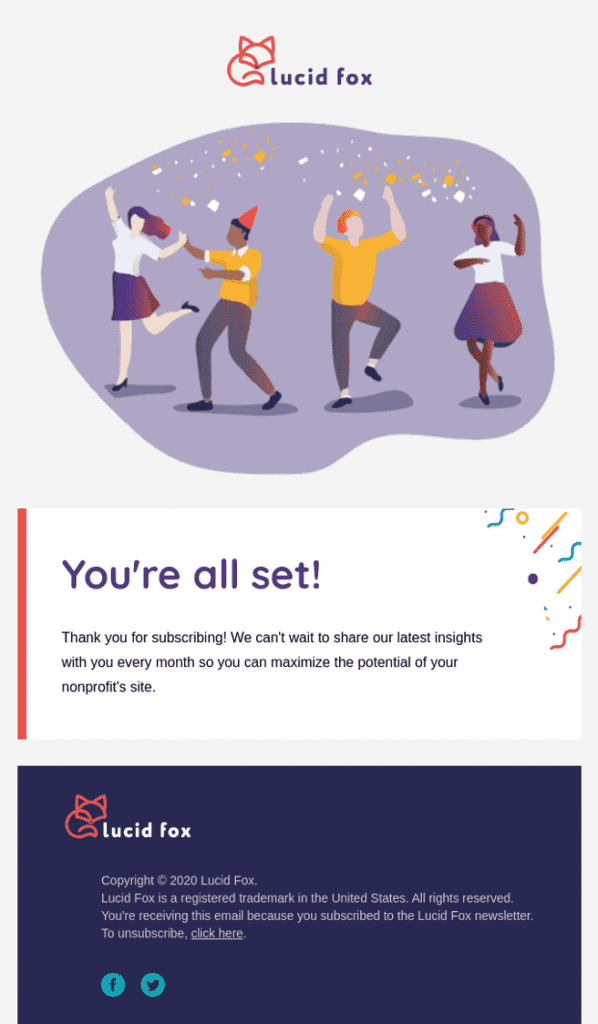
3. Lucid Fox
Source: reallygoodemails.com
Why this subscription confirmation email shines:
This subscription confirmation email is eye-catching and festive. It also lets the new subscriber know the frequency of the emails in a brief message.
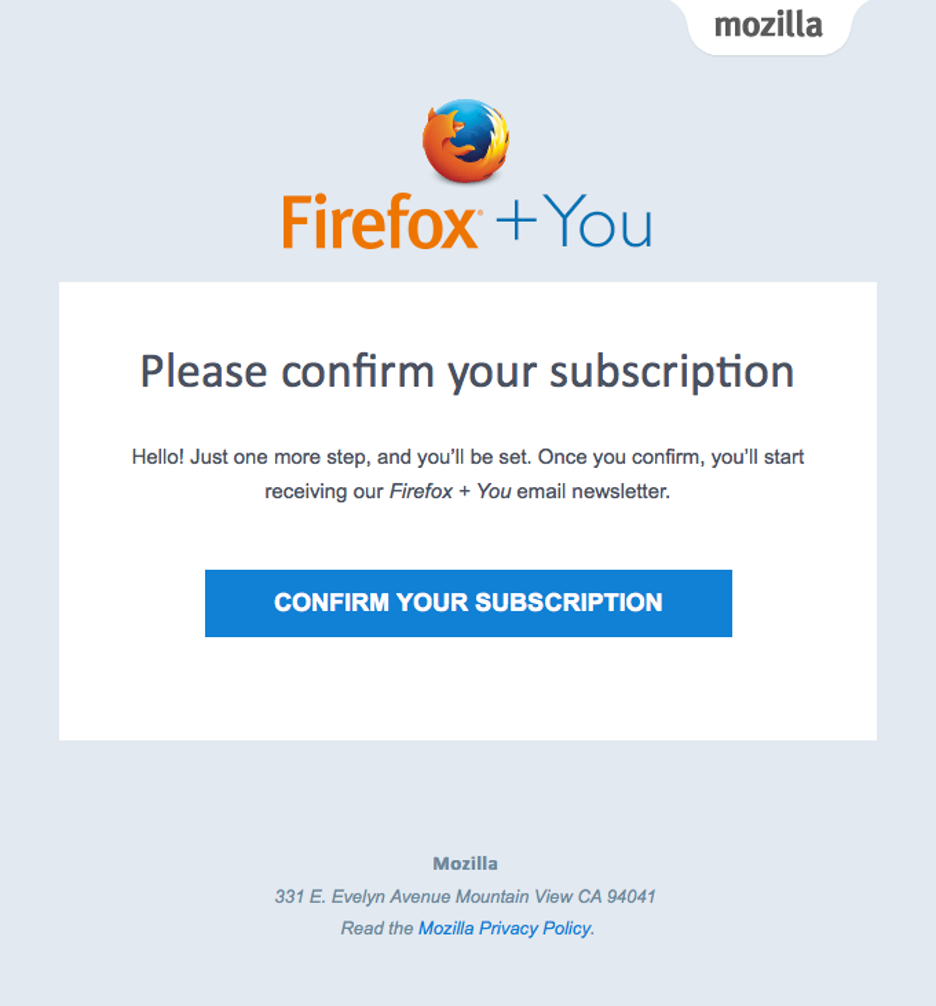
4. Mozilla Firefox
Source: reallygoodemails.com
Why this subscription confirmation email shines:
In this subscription confirmation email, Firefox gives explicit instructions and has a strong call to action. The proactive communication is apparent and the new subscriber knows exactly what they’ll receive when they hit the “confirm subscription” button.
5. Web Summit
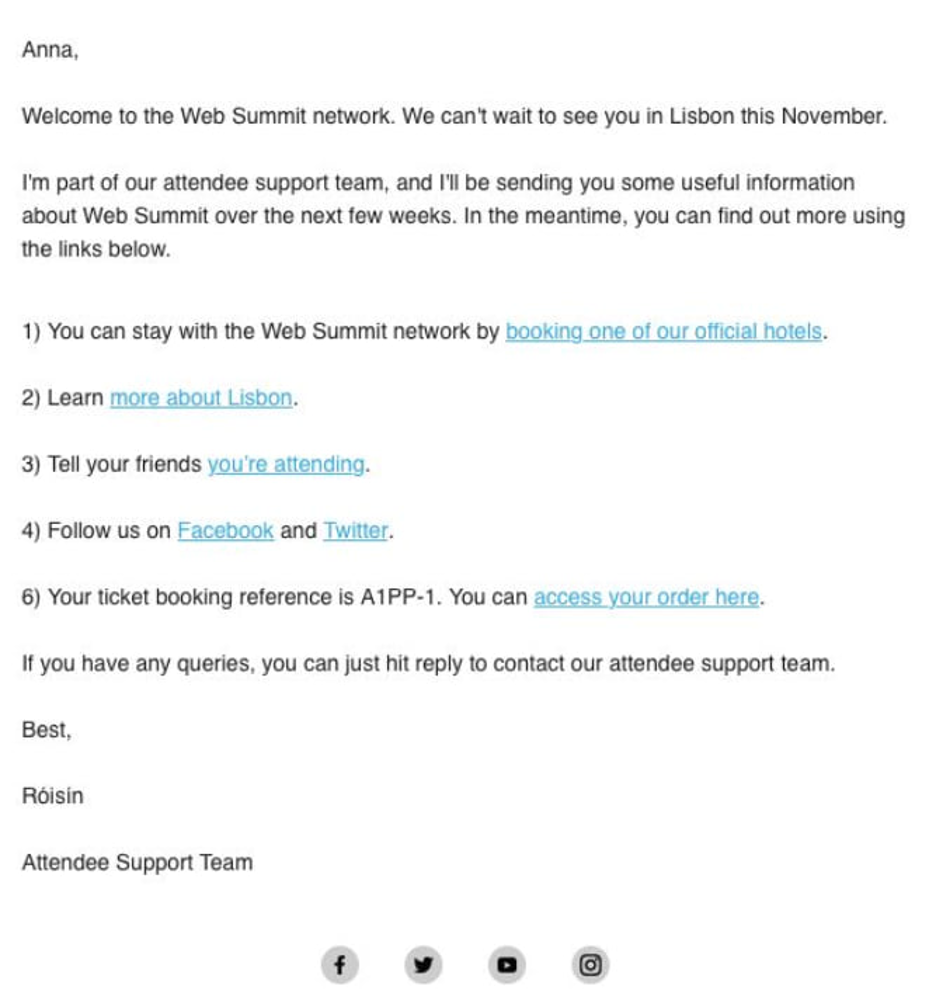
Source: reallygoodemails.com
Why this registration confirmation email shines:
It’s warm in its tone and reads like a message from a close friend. It lets the registrant know what’s coming next and provides helpful links to relevant resources. There’s a simple call-to-action at the bottom to extend the conversation and build excitement for this event!
6. Wishpond
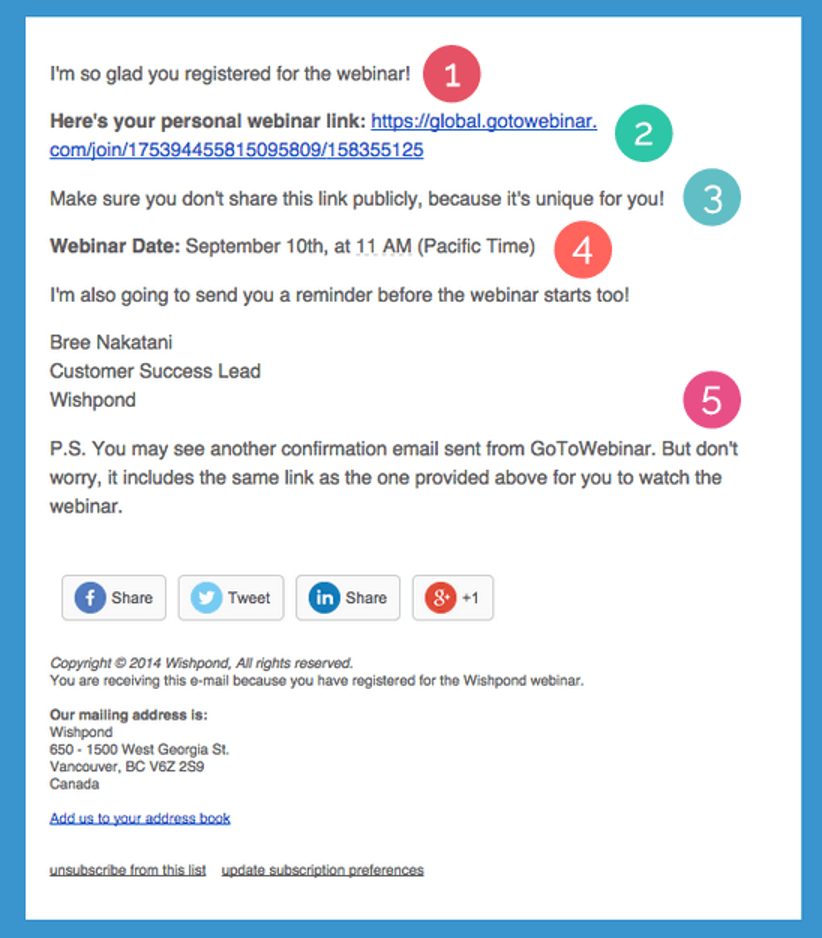
Source: reallygoodemails.com
Why this registration confirmation email shines:
It confirms the registrant’s action, provides the link to the webinar, reminds them of the time & date, and intercepts potential confusion with a clarifying message at the bottom. Once again, the copy is casual and singular (even if thousands of people got this same message!).
7. Airbnb
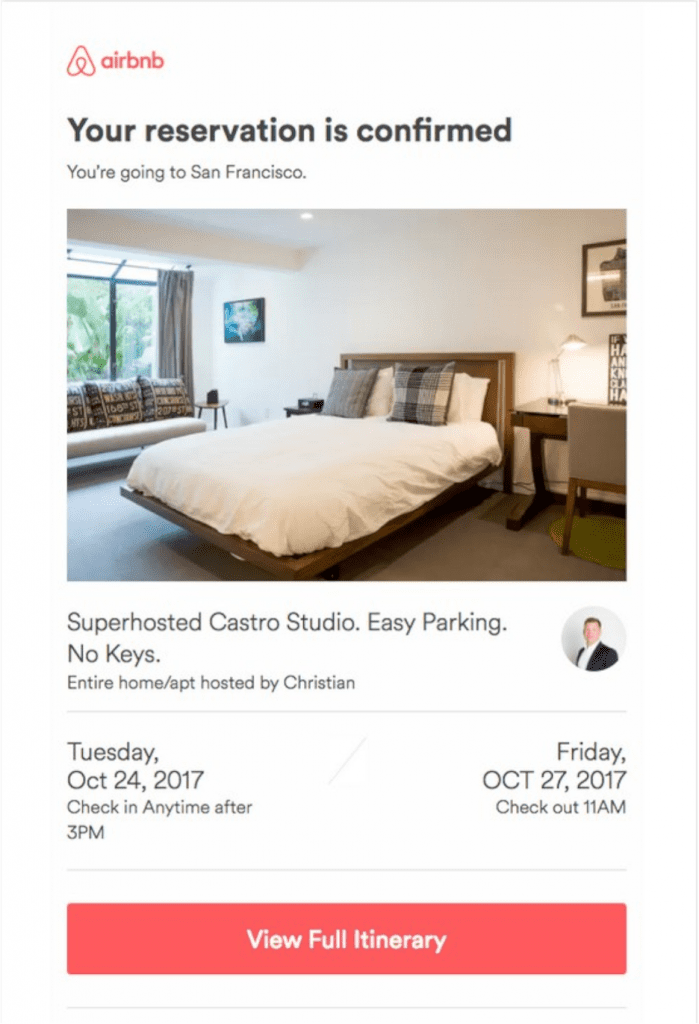
Source: reallygoodemails.com
Why this booking confirmation email shines:
Trips are fun and confirmation emails should reflect that! AirBnB does an excellent job incorporating their bright colors, casual copy, and clear booking summary in their booking confirmation emails.
8. Tock
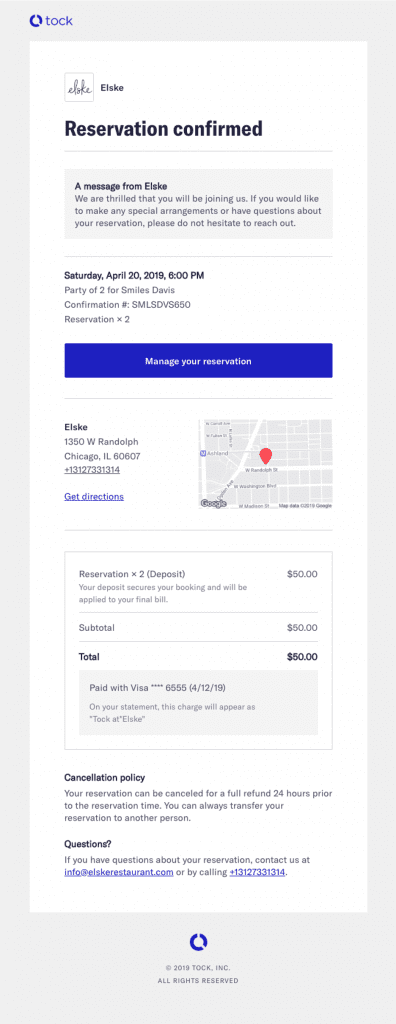
Source: reallygoodemails.com
Why this booking confirmation email shines:
It’s branded, has a clean design, and fun copy with a summary of the dinner reservation. Need to change something? There’s a clear “Manage Reservation” button in the email’s body. Lastly, the restaurant’s address is added at the bottom, just in case!
Now it's your turn to start working on your confirmation message!
Confirmation emails give you an excellent chance to ease your customers’ post-order anxiety, get them excited about an upcoming event, and build a stronger relationship with anyone who signs up for your email list.
In this article, you learned about the different types of confirmation emails along with best practices.
You discovered how to set up your confirmation emails in 5 easy steps, and you got a breakdown of 8 powerful confirmation email examples to learn from.
Most importantly, you learned that there are some non-obvious places in your marketing and sales funnel that can be improved upon and get you more engagement, better leads, and more sales.
Migration has never been easier
We made switching a no-brainer with our free, white-glove onboarding service so you can get started in the blink of an eye.
What should you do next?
Thanks for reading till the end. Here are 4 ways we can help you grow your business:
Boost conversions with proven use cases
Explore our Use Case Library, filled with actionable personalization examples and step-by-step guides to unlock your website's full potential. Check out Use Case Library
Create a free OptiMonk account
Create a free OptiMonk account and easily get started with popups and conversion rate optimization. Get OptiMonk free
Get advice from a CRO expert
Schedule a personalized discovery call with one of our experts to explore how OptiMonk can help you grow your business. Book a demo
Join our weekly newsletter
Real CRO insights & marketing tips. No fluff. Straight to your inbox. Subscribe now
Share this article
Written by

Nikolett Lorincz
Nikolett is the Head of Content at OptiMonk. She is obsessed with content marketing and loves creating educational content for ecommerce store owners. She truly believes in the importance of quality over quantity.
You may also like
- Posted in
- Marketing
Partner with us
Ask AI for a summary of OptiMonk


- © OptiMonk. All rights reserved!
- Terms of Use
- Privacy Policy
- Cookie Policy